

Florida PE seal vs digital signature is an important distinction when preparing engineering plans for electronic submission to a Florida building department. A professional engineer’s visible seal on a drawing is not necessarily the same as a verifiable digital signature attached to the electronic document. Understanding the difference can help prevent confusion during permit submission and electronic plan review.
Submitting engineering plans in Florida is no longer simply a matter of printing drawings, adding a professional engineer’s seal, and uploading a scan. Many Florida permit applications are submitted electronically, which means engineering documents may need to contain a verifiable digital or electronic signature that satisfies applicable professional requirements and the receiving jurisdiction’s submission process.
The distinction becomes especially important when a city or county permit portal validates the PDF electronically. Florida has specific rules governing how professional engineers sign and seal electronically transmitted engineering documents, while individual permitting authorities may impose additional technical requirements for electronic submissions.
What Is a Florida PE Digital Signature?
A Florida PE digital signature is a certificate-based method that allows a Professional Engineer to digitally sign and seal engineering plans, specifications, reports, calculations, and other documents that require professional engineering responsibility.
The purpose is not simply to place an image of an engineer’s seal on a drawing. A compliant digital signature provides a way to verify the identity of the signer and determine whether the signed document has been changed after it was signed.
Under Florida Rule 61G15-23.004, a professional engineer using a digital signature must use a signature that is unique to the engineer, capable of verification, under the engineer’s control, and linked to the document so that changes to the document can invalidate the signature.
This creates an important distinction between the visual appearance of a PE seal and the underlying electronic authentication of the document. A drawing can visibly show a professional seal while still failing an electronic validation check if the PDF does not contain an appropriate digital signature.
Why Florida PE Digital Signatures Matter for Permit Plans
Electronic permitting has changed how engineering documents are reviewed. Instead of receiving only physical sheets, many building departments receive PDF files through online plan-review systems.
When a digitally signed engineering document is submitted, the reviewer or electronic permitting system may need to verify that the document was actually signed by the responsible professional engineer and that the document has not been modified after signing. This protects the integrity of the engineering document.
For example, imagine that a structural engineer reviews a foundation plan and digitally signs the final PDF. If someone later changes a footing dimension, beam size, connection detail, or calculation without having the engineer review the revision, the digital-signature verification can identify that the document has changed.
That is one of the reasons digital signatures are fundamentally different from simply placing a picture of a signature on a PDF.
Florida PE Seal vs Digital Signature
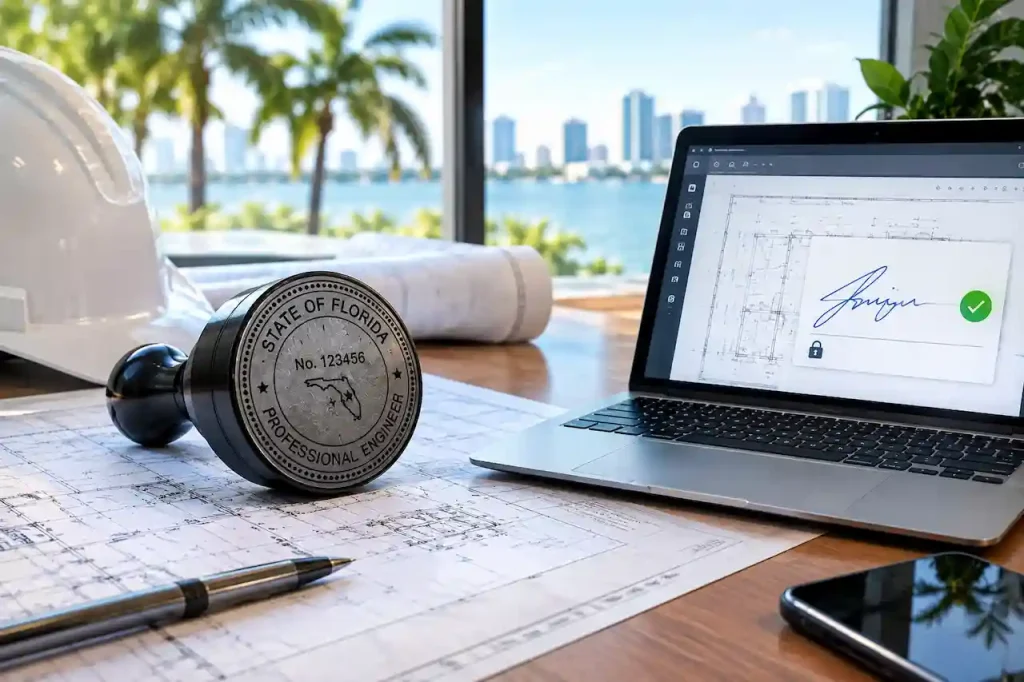
A PE seal and a digital signature perform related but different functions. The professional engineering seal identifies the engineering professional responsible for the work and forms part of the professional signing-and-sealing process. The digital signature provides electronic authentication of the document.
Think of the visible seal as part of the professional identification and certification process, while the digital signature provides an electronic mechanism for verifying the signed document. This distinction matters because someone can copy an image of a professional seal into a PDF. They cannot create the same level of cryptographic document verification simply by copying that image.
Florida’s Board of Professional Engineers specifically explains that a digital signature must be capable of verification and linked to the document so that changes can invalidate the signature.
Is a Scanned PE Stamp Valid for Electronic Permit Submission?
A scanned image of a physically signed and sealed engineering document should not automatically be treated as a digitally signed engineering document. The problem is straightforward. A scanned PDF is essentially an image of a physical document. The scan itself does not provide the same electronic authentication mechanism as a compliant digital signature.
Florida’s engineering rules specifically address the difference between electronic or digital signatures and scanned signature images. The Board states that a scanned image of an original signature is not a substitute for a digital or electronic signature under the applicable engineering signing-and-sealing requirements.
This does not mean every Florida permit application must follow exactly the same upload process. The specific requirements of the city, county, or other authority reviewing the project still matter. The safest approach is to determine the AHJ’s electronic-submission requirements before the final engineering documents are issued.
Florida Digital Signature vs Electronic Signature
The terms digital signature and electronic signature are sometimes used as if they mean the same thing. For Florida engineering documents, that can create confusion.
Florida provides separate procedures for digitally signing and sealing engineering documents and for electronically signing and sealing them. A certificate-based digital signature is addressed under Rule 61G15-23.004. The rule requires authentication through a certification authority and establishes requirements for uniqueness, verification, control, and document integrity.
Florida also has a separate procedure under Rule 61G15-23.005 for electronically signing and sealing engineering documents. That procedure uses an authentication-code-based process and includes requirements for the electronic documents and associated signature information.
Therefore, digital and electronic signing should not simply be treated as interchangeable terminology when preparing permit documents.
What Makes a Florida PE Digital Signature Verifiable?
Verification is one of the most important parts of the digital-signature process. A compliant digital signature is connected to the signed electronic document. The signature is designed so that changes to the document can be detected.
For example, if an engineer signs a final structural drawing and someone later modifies the PDF, the relationship between the signature and the document can be affected. The receiving software may then identify the document as having been changed after signing.
Florida’s Board of Professional Engineers explains that the digital signature must be linked to the document in a way that causes the signature and document to be invalidated if document data is changed.
This is why the final PDF should be established before the engineer applies the final digital signature.
Does the PE Need a Third-Party Digital Certificate?
For Florida’s certificate-based digital-signature procedure, the professional engineer’s identity must be authenticated by a certification authority. The Florida Board explains that the digital signature must be obtained from a third-party certification authority. The certification authority verifies the engineer and provides the digital-signature credentials used for signing.
This is different from creating a simple signature inside PDF software. PDF software can be part of the signing workflow, but the software itself does not automatically make every signature a Florida-compliant professional engineering digital signature. The underlying certificate and authentication method are what matter.
Can Adobe Acrobat Be Used for a Florida PE Digital Signature?
PDF software such as Adobe Acrobat can be used as part of the digital-signing process. However, simply selecting a signature tool inside Acrobat does not automatically establish that the resulting signature satisfies Florida’s professional engineering requirements.
Florida’s Board specifically notes that the self-authenticated digital signature option provided directly by Adobe Acrobat should not be used as the equivalent of the required third-party-certified digital signature. Acrobat may be used with an appropriate digital signature obtained through a proper certification authority.
The practical question is therefore not:
“Was Adobe Acrobat used?”
The better question is:
“Was the engineering document signed using an authentication method that satisfies the applicable Florida rule and the AHJ’s electronic submission requirements?”
What Information Should Appear on a Digitally Signed PE Document?
A digitally signed engineering document needs more than a professional’s name somewhere on the drawing. Florida’s rules specify language associated with digitally signed and sealed engineering documents. The document must identify that it has been digitally signed and sealed, and the digital signature must be capable of verification.
The exact presentation can vary within the permitted formatting requirements, but the required wording should not be casually rewritten or removed. This is particularly important when creating custom drawing templates. A drafter should not redesign the professional engineer’s signing area in a way that removes or changes required information.
What Happens If You Edit a PDF After the PE Signs It?
Avoid editing the final engineering PDF after it has been digitally signed. A digital signature is intended to establish the integrity of the signed document. Changing information after signing can affect the signature’s validity or cause the receiving system to report that the document has been modified.
This is why the engineering workflow should normally happen in this order:
First, the drawing package is prepared.
Next, the design and technical information are coordinated.
Then, required engineering calculations and supporting information are completed.
The Professional Engineer reviews the final engineering documents.
Only after the documents are ready for issuance should the final digital signing and sealing take place.
If the permit reviewer later requests a change to the engineering design, the appropriate response is normally to revise the engineering documents and have the Professional Engineer review and sign the revised final documents rather than modifying the previously signed PDF.
Why Permit Portals Can Reject a Proper-Looking PE PDF
A PDF can look completely correct to a person and still fail an electronic validation process. A permit portal may examine information that is not obvious from the visual appearance of the drawing. Depending on the system and jurisdiction, this can include certificate information, signature validity, document integrity, certificate trust, file configuration, or other submission requirements.
That means a message such as “signature cannot be verified” does not automatically prove that the engineer’s license or PE seal is invalid. The actual technical rejection should be reviewed first.
This distinction is particularly important because SitePlansFL already has a separate guide focused specifically on Florida PE digital-signature permit rejection and portal validation. This article focuses on understanding the signing methods themselves rather than duplicating that troubleshooting content.
Do Florida Cities and Counties Have Their Own Requirements?
Yes. Florida’s professional engineering rules establish requirements for signing and sealing engineering documents, but the receiving permitting authority can have its own electronic-submission procedures.
The exact upload requirements can vary between jurisdictions. For example, some permitting systems may provide specific instructions for digitally signed PDFs, file naming, individual sheets, signature validation, or document uploads. A jurisdiction may also use a particular electronic plan-review platform with its own validation process.
This means a document can satisfy the professional engineer’s signing requirements while still needing to be prepared according to the AHJ’s specific electronic filing instructions. Before submitting the final package, check the requirements of the exact city or county handling the permit.
What Types of Florida Projects May Require PE-Signed Documents?
The need for professional engineering involvement depends on the project scope, applicable codes, jurisdiction, and professional responsibility involved. Engineering documents can be relevant to projects involving structural changes, foundations, metal buildings, garages, additions, MEP systems, specialized structures, wind design, and other work requiring engineering.
For example, a project involving a new structural foundation may require engineering calculations and PE-stamped structural plans in Florida A metal building may require structural engineering for foundations, connections, anchorage, and wind-related design. A residential addition may require coordination between architectural, structural, electrical, mechanical, and plumbing documents.
The correct signing professional also depends on the discipline and scope of the work. A PE should not simply apply a seal to drawings without reviewing and taking professional responsibility for the engineering work covered by that seal.
How to Prepare Plans Before the PE Digitally Signs Them
The best way to avoid digital-signature problems is to treat signing as the final stage of the engineering-document workflow.
Start with accurate project information. The property address, jurisdiction, scope of work, existing conditions, proposed construction, and relevant design criteria should be established before final signing. The drawing package should then be coordinated so that information agrees across the sheets. Dimensions, structural details, schedules, calculations, notes, and supporting documents should not contradict one another.
If the project requires structural permit drawings, MEP, architectural, or other professional documents, the responsible professionals should review the portions within their respective scopes.. Only after the final corrections have been made should the final PDF be prepared for signing. This approach reduces the risk of having an engineer sign a document that later needs to be edited.
Common Florida PE Digital-Signature Mistakes
Several problems repeatedly create confusion during electronic permit submissions.
- Uploading a scanned wet-signed drawing when the AHJ requires an electronically verifiable signature.
- Treating a graphic PE seal as if it were the digital signature itself.
- Using a self-authenticated PDF signature instead of an appropriate certificate-based signing method.
- Editing the final PDF after the Professional Engineer digitally signs it.
- Submitting an outdated signed drawing instead of the final coordinated revision.
- Ignoring the specific electronic submission requirements of the city or county.
- Assuming that one jurisdiction’s upload requirements automatically apply to another jurisdiction.
The common theme is that professional signing requirements and electronic filing requirements need to be considered together.
What Should You Do Before Submitting Digitally Signed Plans?
Before uploading a final engineering package, review the project from both the professional and administrative sides.
Confirm that the final drawing set is the version approved for signing. Check that the engineer has signed and sealed the correct documents. Confirm that the PDF has not been altered after signing. Then review the AHJ’s electronic submission requirements and make sure the files are being uploaded in the required format.
If the permit office provides specific digital-signature instructions, those instructions should be followed rather than relying on assumptions from another project.
For larger projects, it is also useful to keep a clear record of the final signed files so that the exact documents submitted to the permitting authority can be identified later.
How SitePlansFL Can Help With Permit Drawing Coordination
Preparing a permit package involves more than producing attractive drawings. The documents need to communicate the proposed project clearly and coordinate with the requirements of the permitting authority.
SitePlansFL provides permit drawing and drafting services for residential and commercial projects throughout Florida. Where professional engineering is required, the drawing package can be coordinated with the appropriate engineering scope so the final documents are prepared for the permit process.
If your project requires structural or other engineering documentation, the requirements should be identified before the final drawing package is issued. Our team can also help identify permit-document issues when you already have plan-review comments or Florida permit corrections.
What to Send When You Need Help With a PE-Signed Permit Package
If you already have engineering documents and need help determining what should be submitted, provide the complete project information rather than only sending a screenshot of the PE seal.
Useful information includes the property address, city or county, project scope, current drawing package, permit number if available, engineering documents, and any comments or electronic-submission instructions received from the permitting authority.
If the portal has rejected the signature, include the exact error message. Technical wording such as a certificate-validation error can be much more useful than simply saying that the “PE stamp was rejected.”
The original PDF should also be preserved so the engineer and permit team can determine whether the issue is related to the signing method, document integrity, certificate validation, file preparation, or another permit requirement.
Why Choose SitePlansFL for Florida Permit Drawings?
When a permit package involves multiple drawing disciplines, the quality of coordination matters as much as the individual sheets. We focus on preparing organized permit documentation that reflects the actual project scope and the requirements of the reviewing jurisdiction.
Our approach includes:
- Clear project and property information before drafting begins.
- Coordination of applicable architectural, structural, site, and MEP documentation.
- Attention to jurisdiction-specific permit requirements and review comments.
- Support with permit corrections and revised drawing packages.
- Coordination with the appropriate professional engineering scope when PE involvement is required.
The objective is to give the permitting authority a clear, consistent package that can be reviewed without unnecessary confusion.
Final Takeaway
A Florida PE digital signature is more than a picture of a professional seal on a PDF. It is part of an electronic signing process designed to authenticate the responsible Professional Engineer and protect the integrity of the engineering document. Florida recognizes specific procedures for digitally and electronically signing and sealing engineering documents, and the requirements include more than simply placing a signature image on a drawing.
For permit applicants, the most important step is to establish the final engineering documents before signing, use the appropriate signing method, preserve the original signed PDF, and confirm the electronic submission requirements of the specific Florida jurisdiction reviewing the project.
When those pieces are coordinated from the beginning, digital PE signing becomes a normal part of the permit workflow rather than a last-minute source of rejection or delay.
Frequently Asked Questions
What is a Florida PE digital signature?
A Florida PE digital signature is a method used by a Professional Engineer to digitally sign and seal applicable engineering documents. Under Florida’s digital-signature rules, the signature must be verifiable, associated with the engineer, under the engineer’s control, and linked to the document so changes can be detected.
Is a PE seal image the same as a digital signature?
No. A PE seal image is a visible element of the engineering document. A digital signature provides electronic authentication and document-integrity verification. A graphic seal by itself does not provide the same electronic verification.
Can I scan a wet-signed PE drawing and submit it online?
Do not assume that a scanned wet-signed drawing satisfies an AHJ’s electronic-signature requirements. Florida’s engineering rules distinguish scanned signature images from compliant electronic or digital signatures. The exact submission requirements of the reviewing jurisdiction should be checked before uploading the document.
Does Florida require a third-party digital certificate?
Florida’s certificate-based digital-signature procedure requires the engineer’s identity to be authenticated by a certification authority. The Florida Board explains that the digital signature is obtained from a third-party certification authority.
Can I edit a PDF after the PE digitally signs it?
You should not modify the final digitally signed engineering document. Because the signature is linked to the document, subsequent changes can affect signature verification. If revisions are required, the engineering documents should be corrected and reviewed again before the final signature is applied.
Are digital and electronic PE signatures the same?
No. Florida has separate procedures for digitally signing and sealing engineering documents and electronically signing and sealing them. They should not automatically be treated as identical methods.
Can every Florida city accept the same PE digital-signature format?
Not necessarily. Florida establishes professional signing requirements, while individual authorities having jurisdiction can establish electronic submission procedures. Always verify the requirements of the city or county reviewing your permit.
What if my PE-signed PDF is rejected by the permit portal?
Save the complete rejection message and the original PDF. Do not immediately modify the signed document. The exact technical error should be reviewed against the AHJ’s electronic submission requirements and, where necessary, sent to the Professional Engineer for resolution.